






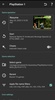

ClassicBoy Pro is a powerful emulator for Android that, just like the fantastic RetroArch, lets you emulate more than a dozen game consoles on your device. The list of consoles that can be emulated includes: the original Playstation, Nintendo 64, Gameboy Color, Gameboy Advance, Gameboy Classic, NES, Sega Megadrive (Genesis), Game Gear, Master System, Sega Saturn, Sega CD, SNK NeoGeo, and Atari 2600 VCS.
As usual with emulators, ClassicBoy Pro doesn't come with any ROMs. Basically, gamers can download the emulator without a problem, but if they want to play games on any of the supported platforms, they'll have to download them from another website. Fortunately, creating your own ROMs is very easy, as is finding them online.
The configuration options not only allow you to customize the controls for each console but also allow you to connect console controllers to your device. You can use Bluetooth to link a Playstation 3 or Xbox 360 controller to your Android device, for example. After that, you can use the emulator to play any game with your favorite controller.
ClassicBoy Pro is a powerful emulator for Android, thanks to which you can emulate many different platforms with a single app. The PRO version of this emulator, which can be purchased from the app itself, allows you to save the game at any time using several different 'save states.'
Requirements (Latest version)
- Android 5.0 or higher required


 7 reviews


















Comments
The emulator is excellent!
I made the payment for the full version of the app, but it did not unlock any advanced features as promised. Waiting for a response from Google and the app developers.